Shortcuts
The plugin lets you bind cheat actions to keyboard shortcuts so you don't need to open the cheat window for common operations.
Default Shortcuts
Many actions come pre-bound to convenient shortcuts. You can use these immediately without any setup.
| Action | Shortcut |
|---|---|
| Toggle Cheat Window | Ctrl + C |
| Toggle "Save Locations" Tab | Ctrl + M |
| Quick Save (Slot 1) | Ctrl + S |
| Quick Load (Slot 1) | Ctrl + Q |
| Open Save Scene | Ctrl + [ |
| Open Load Scene | Ctrl + ] |
| Go to Title Screen | Ctrl + T |
| Force Victory (in Battle) | Ctrl + V |
| Force Defeat (in Battle) | Ctrl + D |
| Force Escape (in Battle) | Ctrl + E |
| Toggle No-Clip | Alt + W |
| Toggle Mouse Teleport | Alt + M |
| Enemy Wound (Set 1 HP) | Alt + 1 |
| Enemy Recovery | Alt + 0 |
| Party Wound (Set 1 HP) | Alt + 2 |
| Party Recovery | Alt + 9 |
| Open DevTools | F12 |
Customizing Shortcuts
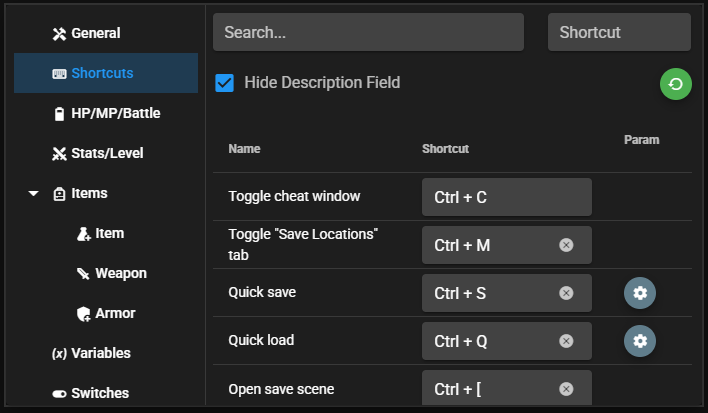
You can change any of these bindings or add new ones in the Shortcuts tab:
- Open the cheat window (Ctrl + C).
- Go to the Shortcuts tab.
- Click the action you want to bind.
- Press the key combination you want to use.
- The binding is saved automatically.
Sharing Shortcuts Across Games
Shortcut bindings are stored in www/cheat-settings/ (MV) or cheat-settings/ (MZ) inside the game folder. To reuse your shortcuts in another game, simply copy this folder. See Sharing Settings for more details.